Semantic models in Power BI and Fabric consume memory and when that memory runs out, refreshes fail and queries time out. This article breaks down why model size matters, how memory actually behaves and six practical patterns you can apply to optimize your model.
Why model size matters
In Power BI and Fabric, model size equals memory consumption. The more data your model contains, the larger its memory footprint.
Exceeding memory limits can lead to:
- Failed refreshes
- Query timeouts
- Increased capacity usage
When that happens, you’re left with two choices:
- Optimize the model
- Upgrade your capacity
Why memory optimization matters
Keeping your model size under control provides several key benefits:
- Lower cost: Smaller models reduce the need for higher Fabric SKUs or upgrade licenses
- Faster refresh: Less data and better compression improve refresh times
- Better performance: Copilot, data agents, and DAX queries run more efficiently
How memory actually behaves
Memory limits in Fabric
One of the most important things to understand is that memory in Fabric is a hard limit.
Unlike compute, which can temporarily scale or “burst,” memory cannot exceed its allocated capacity. Once the limit is reached, operations fail.
Key characteristics:
- Memory limits are enforced per semantic model
- A single oversized model will fail independently of others
The hidden challenge: refresh memory
One of the most overlooked aspects of memory is how it behaves during refresh. In Import mode, a full refresh:
- The current model remains in memory
- A new copy of the model is processed in parallel
- Adds processing overhead and query memory usage
This means a model that “fits” at rest can still fail during refresh due to insufficient headroom. When designing a model always consider additional memory capacity not just the final model size.
Memory vs. file size
It’s important not to confuse memory usage with the size of your .pbix file.
- Memory: VertiPaq (compressed data loaded into RAM)
- PBIX size: Compressed file on disk + metadata
A model may appear small on disk but still consume significant memory when loaded.
Storage modes: trade-offs, not solutions
Changing storage mode does not eliminate memory constraints it only redistributes them:
- Import: Best performance, predictable memory usage
- Direct Lake: Loads data on demand, still consumes memory during queries
- DirectQuery: Minimal memory usage, but slower queries and higher source load
Storage modes change how memory is used not whether it’s used.
Measure before you optimize
Before making any changes, you need clear visibility into the system. To achieve that, you can use tools such as:
- VertiPaq Analyzer (Tabular Editor 3, DAX Studio)
- Memory Analyzer (Fabric notebooks)
They allow you to identify exactly which columns consume the most memory and this is how you move from:
“My model is too big” to “This specific column is the problem.”
Six proven patterns to optimize model size
These six patterns range from removing unused data to more advanced compression and aggregation strategies.
Pattern 1: reduce unnecessary data
This is the simplest and most effective way to lower semantic model size and the goal is straightforward: only include what you actually need.
In practice, this means:
- Removing unused columns or tables
- Filtering out unnecessary rows (limiting historical data)
- Aggregating older data instead of storing full detail
It’s common to include extra data “just in case,” but this comes at a real cost. If a column or dataset doesn’t support a clear reporting requirement, it likely doesn’t belong in your model.
If you’re working on refactoring an existing model, it’s useful to identify columns that aren’t used in calculations or relationships. Tabular Editor’s Best Practice Analyzer includes a rule that helps you detect these unused columns.
Pattern 2: reduce cardinality and dictionary size
What if you’ve identified some large columns that are essential to your model and can’t be removed. The solution is reducing cardinality and dictionary size should be the next step.
High-cardinality columns (columns with many unique values) are one of the biggest causes of model size. VertiPaq stores a dictionary of unique values per column, so more uniqueness equals more memory.
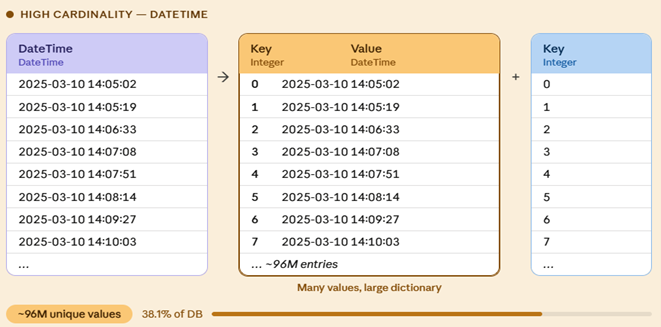
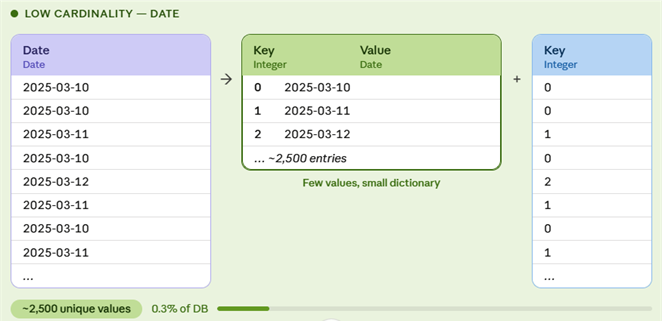
Common solutions include:
- Splitting usually DateTime into separate Date and Time columns
- Reducing precision (Rounding decimals)
- Avoiding floating-point types like Double, Single, Float for values that require exact precision
- Not use String data types for numerical columns
Reducing unnecessary columns removes entire structures from the model, while reducing cardinality shrinks the columns that must remain.
Pattern 3: disable unnecessary attribute hierarchies
Power BI automatically creates attribute hierarchies for every column to support MDX queries (used by Excel PivotTables).
The issue with this is that most of these hierarchies are never used but they still consume memory.
Disabling IsAvailableInMDX removes unused hierarchy structures and reclaims the associated memory.
This is especially valuable because it:
- Improves performance by avoiding unnecessarily wide result sets
- Returns only the columns required for analysis
- Prevents high-cardinality columns from being used in PivotTables
The column remains usable in DAX and reports, but it simply stops generating unnecessary metadata.
Pattern 4: use user-defined aggregations
In some scenarios, removing high-cardinality detail columns isn’t an option. When that happens, user-defined aggregations provide an effective alternative. This approach splits your data into two layers:
- Aggregated queries: fast, in-memory
- Detail-level drillthrough: retains high-cardinality columns that can’t be afforded to be imported
Most queries hit the aggregated layer, while detailed drillthrough queries go to the source system.
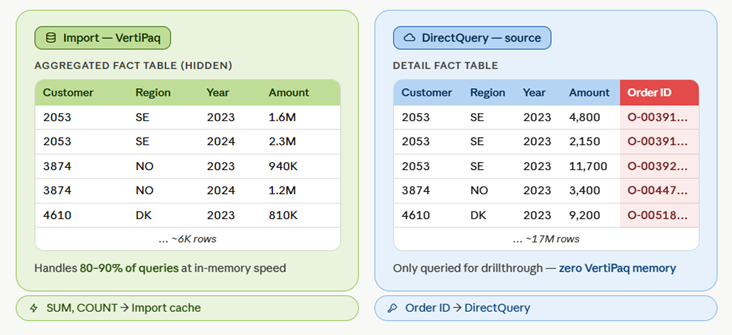
The detailed DirectQuery table remains part of the model, but unlike imported data, it doesn’t consume VertiPaq memory.
The result:
- Significant memory reduction
- Slight trade-off in query performance for detailed views
This pattern works best when most reporting:
- Most reporting (around 80–90%) is based on aggregated data
- Detailed, row-level data is only queried occasionally
- The model size is largely driven by high-cardinality columns
- When detailed data is needed, it’s usually filtered heavily
Pattern 5: split large models into smaller ones
Instead of one large model consider breaking it into smaller, subject-oriented semantic models.
Each model would then contain only the tables and columns required for its analytical scope.
Why this helps:
- Memory limits are enforced per model
- Smaller models reduce peak memory consumption
- Easier governance and maintainability
However, this introduces complexity:
- Reports can only connect to one model
- Cross-domain analysis becomes harder
This pattern is most effective when domains are clearly distinct and there’s little need for users to perform cross-domain analysis.
Pattern 6: optimize run-length encoding (RLE)
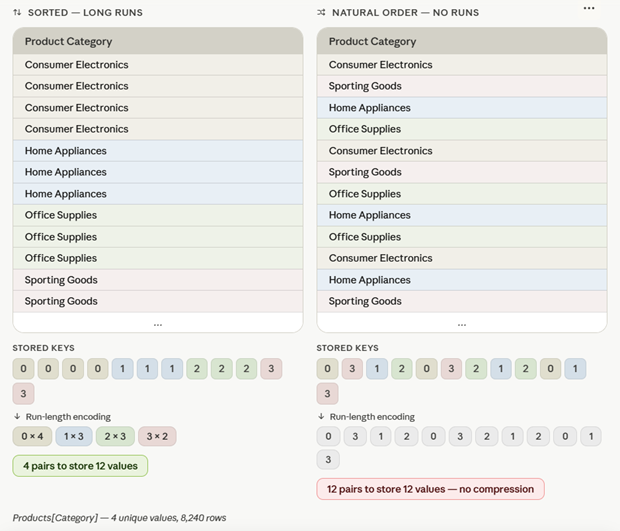
Run-Length Encoding (RLE) is a compression technique used by VertiPaq.
It works best when identical values are stored consecutively. The longer the sequence of identical values in the column segment, the better the compression.
In other words, the way data is sorted and how columns are structured can influence overall memory usage.
This pattern is worth evaluating when:
- Large fact tables are the primary driver of memory consumption
- Other column-level optimizations have already been implemented
- The model can’t be further divided into smaller parts
- You need to improve performance without altering the underlying business logic
You can implement the RLE by:
- Modifying sort order
- Partitioning of the data
This doesn’t change the data itself only how efficiently it’s compressed. In some cases, it can reduce model size by double-digit percentages.
Final thoughts
This article explored what semantic model memory is, why it matters, and how to measure it effectively. It was also done a walkthrough of six practical techniques ranging from quick wins to more advanced strategies that can help you optimize your models and get better performance.
By combining solid fundamentals with targeted optimizations, you can:
- Stay within memory limits
- Improve performance
- Reduce costs
- Build scalable, reliable semantic models in Fabric